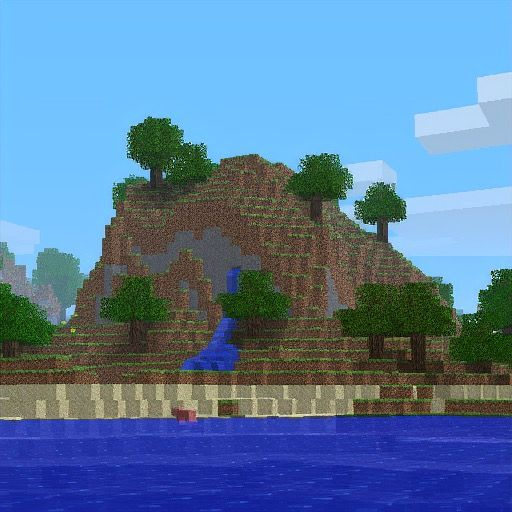
Minecraft Pack.png Seed: 3257840388504953787
The world seed behind Minecraft's default resource-pack icon — and the exact Alpha 1.2.2 coordinates, camera angles, and level.dat edits you need to recreate it.
Published · Updated · ~10 min read
Quick facts
- Seed
3257840388504953787- Exact match version
- Java Alpha 1.2.2a
- Works in 1.21 / Bedrock?
- No — world gen is different
- First shared
- Reddit, 2017 (u/Dr_Tardis)
- Viewpoint
- X ≈ 49.16, Y ≈ 64, Z ≈ 0.72 · yaw −119.23 · pitch −8.297 · FOV 70
Looking for modern seeds instead? Browse the Java seed map or best 1.21 seeds.
What is pack.png?
pack.png is the small square icon Minecraft shows next to a resource pack in the pack menu. The default icon is a tiny landscape screenshot — grass, trees, water, sky — that every Java player has seen for years.
That image was not drawn by hand. It came from an early Alpha world. Years later, players reverse-engineered which seed, player position, and camera settings produce the same view, and the result became one of Minecraft's most famous seeds: 3257840388504953787.
How the pack.png seed was found
In 2017, Reddit user u/Dr_Tardis posted that a world looked eerily like the default resource-pack icon. The post spread fast because it felt like an Easter egg — but it wasn't one Mojang had planted in modern world gen.
The deeper story is reverse engineering: community researchers matched cloud patterns, FOV, crop size, and Alpha camera offsets until a screenshot lined up with the shipped pack.png file. That work is why we have precise numbers today, not just "it looks similar from over here."
So this seed is special for two reasons: it is a neat coincidence of procedural generation, and it is also a documented reconstruction of an actual Mojang screenshot from Alpha.
Version compatibility (read this first)
| Edition / version | Looks like pack.png? |
|---|---|
| Java Alpha 1.2.2a | Yes — exact match with the coords below |
| Later Alpha / Beta (same terrain era) | Similar terrain possible; camera/FOV details differ |
| Modern Java (1.18–1.21+) | No — completely different world generation |
| Bedrock (all platforms) | No |
Older guides (including an earlier version of this page) sometimes said the seed "works from 2017 onward." That is misleading. You can enter the number in modern Java, but the pack.png landscape will not appear. The icon match is an Alpha phenomenon.
Exact seed, coordinates, and camera
Use these values in Alpha 1.2.2a if you want the view that matches the default pack icon:
- Version: Alpha 1.2.2a [JAVA]
- Seed: 3257840388504953787
- Player X: 49.16~
- Player Y: 64 (eye ≈ 65.62)
- Player Z: 0.72~
- Yaw: −119.23
- Pitch: −8.297
- FOV: 70 (Normal)
- In-game time: ~34 seconds (cloud match)
- Window: 1600×1116
- Crop: 622;284 → 512×512 → downscale to 128×128
Alpha places the camera 0.1 blocks behind the player. Other versions need that offset compensated if you are chasing a pixel-perfect crop.
How to load the pack.png seed in Alpha 1.2.2
Alpha 1.2.2 has no seed text box. You create a world, then overwrite the seed inside level.dat.
- Enable historical versions in the Minecraft Launcher and install Alpha 1.2.2 (not "Release 1.2.2").
- Create a new world, load it once, then save and quit.
- Open that world's folder under
.minecraft/savesand delete everything exceptlevel.dat. - Open
level.datin our Minecraft NBT Editor (or any NBT tool). - Set RandomSeed to
3257840388504953787. - Expand Player and set position / rotation to the values in the table above.
- Save the file, put it back in the world folder if needed, launch Alpha again, and load the world.
If the terrain looks wrong, you still have leftover region files from the temporary world, or you are not on Alpha 1.2.2a. Wipe everything but level.dat and try once more.
Bringing an Alpha pack.png world into modern Java
Want to walk around the icon landscape with modern controls? Generate (or correctly load) the world in Alpha first, then open it once in Beta 1.7.3 to convert the save format, then open that save in a current Java release.
Converted chunks keep the old Alpha shape. Explore too far and new chunks generate with modern rules, so the pack.png silhouette ends at the old world border. Treat it as a museum piece, not a long-term survival map.
Video explainers
If you want the story and method visually:
Frequently asked questions
What is the Minecraft pack.png seed?
The pack.png seed is 3257840388504953787. In Minecraft Alpha 1.2.2, standing at a specific position and camera angle makes the terrain look exactly like the default resource-pack icon (pack.png). That match only exists in Alpha-era world generation.
Does the pack.png seed work in modern Minecraft 1.21?
No. Modern Java and Bedrock world generation are completely different from Alpha. Entering 3257840388504953787 in 1.21 will create a normal world that does not look like pack.png. To see the icon, you need Alpha 1.2.2a (or convert an Alpha world forward).
Who discovered the pack.png seed?
Reddit user u/Dr_Tardis shared the resemblance in 2017. Later, the community reverse-engineered exact coordinates, camera angles, FOV, and crop settings so the view could be recreated pixel-for-pixel — covered in videos by creators such as SalC1.
Was pack.png an intentional Mojang Easter egg?
No. pack.png was a screenshot Notch used as the default resource-pack icon. The seed and camera that recreate it were found by players years later. It is a coincidence of Alpha terrain generation, not a hidden code Easter egg.
How do I load the pack.png seed in Alpha 1.2.2?
Alpha 1.2.2 cannot type seeds in the create-world screen. Create a world, exit, open level.dat in an NBT editor, set RandomSeed to 3257840388504953787, set the player position and rotation to the documented values, save, and reload the world.
What are the exact coordinates for pack.png?
Player X ≈ 49.16, Y ≈ 64 (eye ~65.62), Z ≈ 0.72, yaw −119.23, pitch −8.297, FOV 70, in-game time about 34 seconds, then crop a 512×512 region and downscale to 128×128. Alpha also places the camera 0.1 blocks behind the player.
Can I use the pack.png seed on Bedrock Edition?
No. Bedrock never used Alpha Java world generation, so this seed will not recreate pack.png on Bedrock, Pocket Edition, consoles, or Windows Bedrock.
How do I bring an Alpha pack.png world into a newer version?
Generate (or load) the world in Alpha 1.2.2, then open it once in Beta 1.7.3 to convert the save format, then open it in a modern Java version. New chunks beyond the converted area will use modern generation and will not continue the Alpha look.
Related on CraftMC
- Minecraft NBT Editor — edit
level.datRandomSeed and player data in the browser - Java Edition seed map — biomes and structures for modern seeds
- Top Java 1.21 seeds
- Village seeds for 1.21.5